Amazon Consent Signal: What it is and how to set it up in Usercentrics and Cookiebot

Amazon Consent Signal matters if you send UK or EEA user data to Amazon Ads, because Amazon needs a valid way to read and apply that user’s consent choice. If that signal is missing or set up incorrectly, measurements can break, audience targeting can be affected, and privacy risks become harder to control.
In this guide, we’ll explain what the Amazon Consent Signal is, who actually needs it, and how it differs from Google Consent Mode. We’ll also walk through how to set it up in Usercentrics and Cookiebot, plus what to test after setup, so you can tell whether ACS applies to your site and whether it is working properly.
What is Amazon Consent Signal?
Amazon Consent Signal, or ACS, is Amazon’s consent-sharing format for Amazon Ads. It tells Amazon whether a user has allowed personal data to be used for advertising and whether Amazon can use advertising cookies or similar technologies.
ACS uses two parameters: amzn_user_data and amzn_ad_storage. amzn_user_data controls whether Amazon can process personal data for advertising purposes, while amzn_ad_storage controls whether Amazon can read or write advertising cookies or similar storage on the device.
Both values are sent as GRANTED or DENIED. In most setups, ACS is stored in a first-party cookie called amzn_consent, which can also include details such as the timestamp, version, and country code.
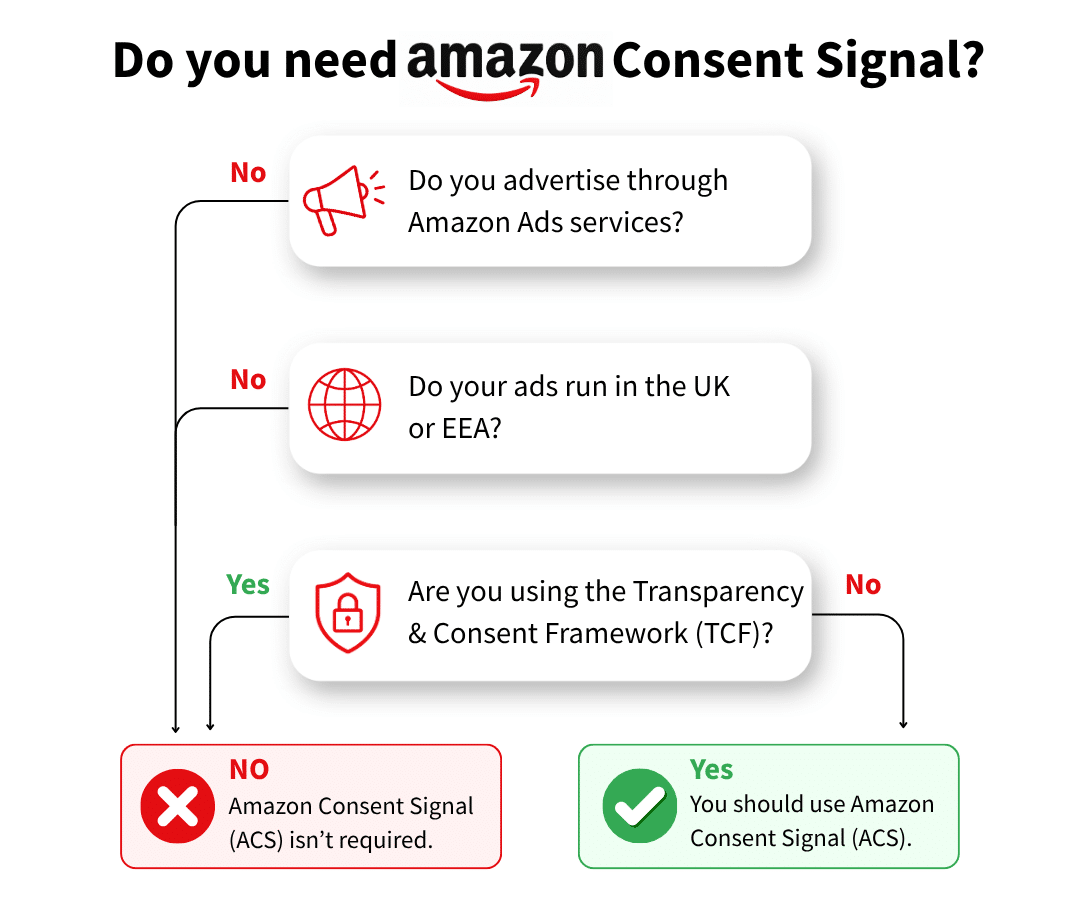
Do you need Amazon Consent Signal?
Amazon Consent Signal matters if you use Amazon advertising services and send UK or EEA user data to Amazon Ads. In those cases, Amazon needs consent in a format it accepts.
There is one key exception. If your site already uses the IAB Transparency and Consent Framework and Amazon is covered there, you may not need ACS as a separate setup.
A simple way to check is to ask three questions:
- Are you using Amazon advertising services?
- Are UK or EEA users in scope?
- Are you already relying on TCF for Amazon consent?
If the answer to the first two is yes and the third is no, ACS is likely something you need to review.
How Amazon Consent Signal works
Amazon Consent Signal follows a simple flow on the page. A user lands on the website, the CMP shows the consent banner, and the user accepts or declines the relevant choice. The CMP then writes the Amazon consent signal in the expected format, and Amazon reads that signal to decide how the data can be used.
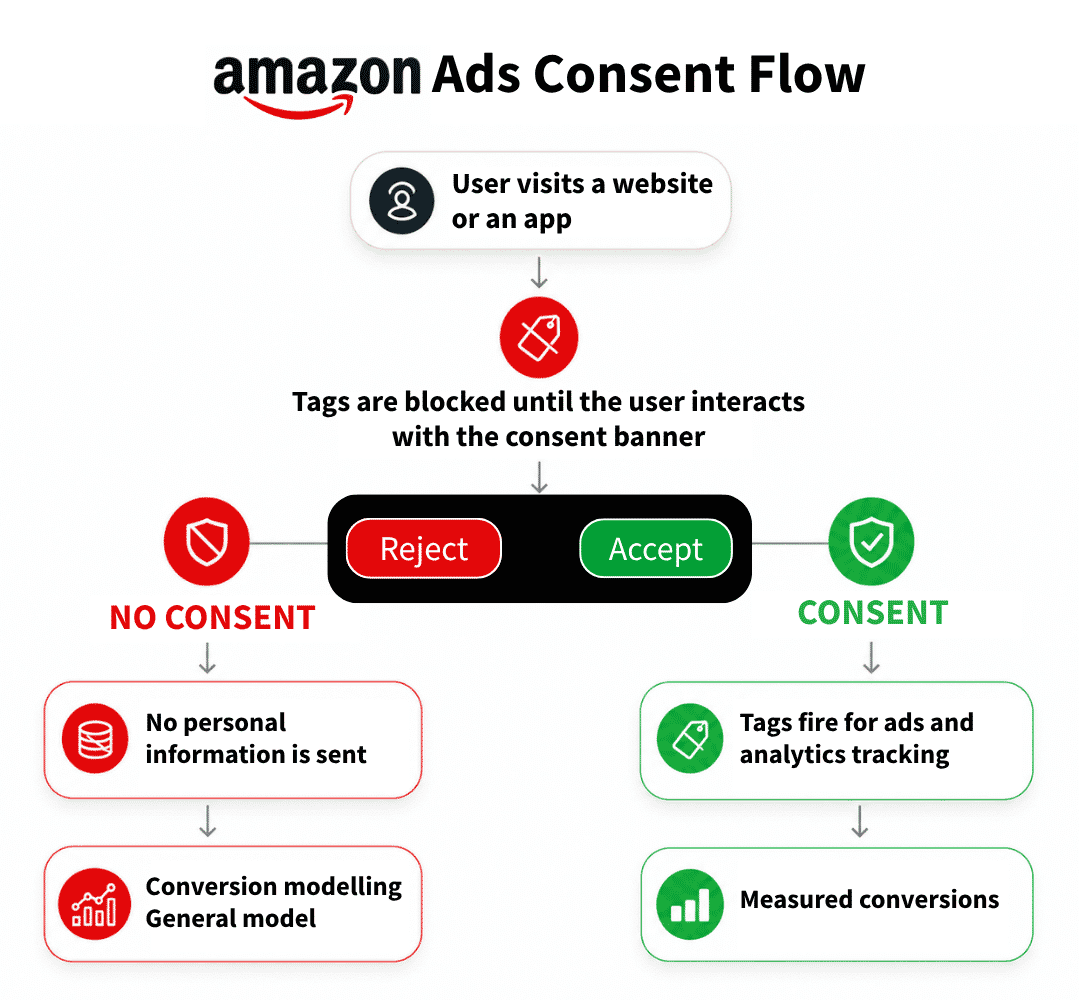
Two practical details are worth knowing here. The country code matters because Amazon needs to know where the consent was collected, and some sites can run into WAF issues because the amzn_consent cookie contains a JSON-like value that security rules may flag.
If the setup looks right in the CMP but the cookie does not appear properly on the site, that is often the first thing to check. This is why testing the live output matters just as much as turning the feature on.
Amazon Consent Signal vs Google Consent Mode
Amazon Consent Signal and Google Consent Mode are easy to mix up, but they do different jobs. Amazon Consent Signal is for Amazon Ads, while Google Consent Mode is for Google products such as Google Ads and GA4.
They can both exist on the same site, and one does not replace the other. Having Google Consent Mode in place does not mean Amazon consent is handled.
How to set up Amazon Consent Signal in Usercentrics and Cookiebot
Both Usercentrics and Cookiebot support Amazon Consent Signal, but it still needs a proper setup and a live check after that. We’ll start with Usercentrics and show how to add Amazon advertising, turn on ACS, and confirm that the signal is working on the site.
Configuring Amazon Consent Signal in Usercentrics
Usercentrics has built-in support for Amazon Consent Signal, so the setup is mostly about adding the right service first and then enabling ACS in the CMP settings.
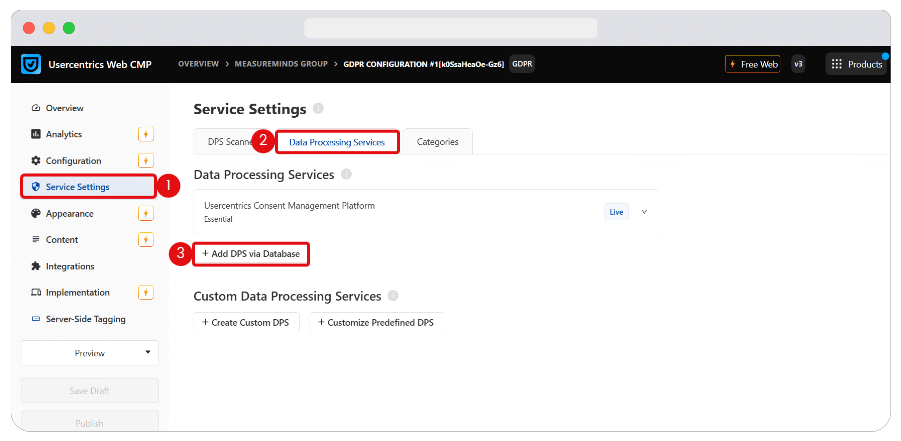
Start by logging in to your Usercentrics account. From the left sidebar, open Service Settings, go to the Data Processing Services tab, and click Add DPS via Database.
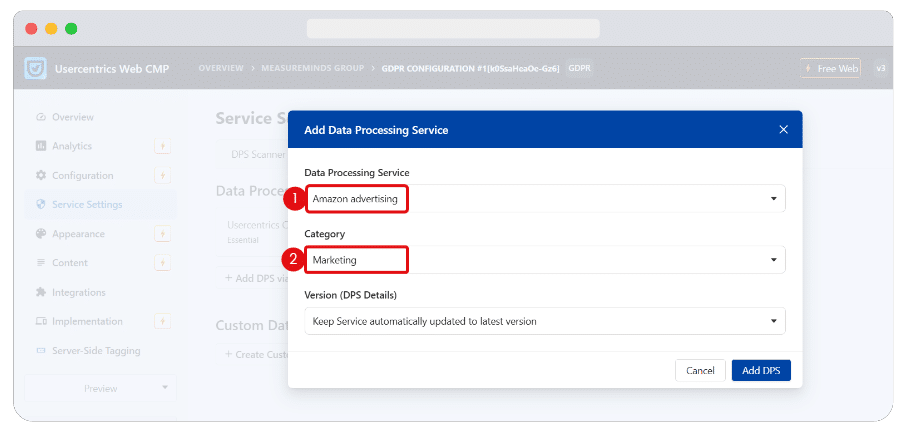
Then, in the popup window, choose Amazon advertising from the list of Data Processing Services and set the category to Marketing. Once that is done, click Add DPS.
After that, go to Configuration from the sidebar and open the CMP Settings tab. Find Amazon Consent Signal, switch it on, and then publish the changes.
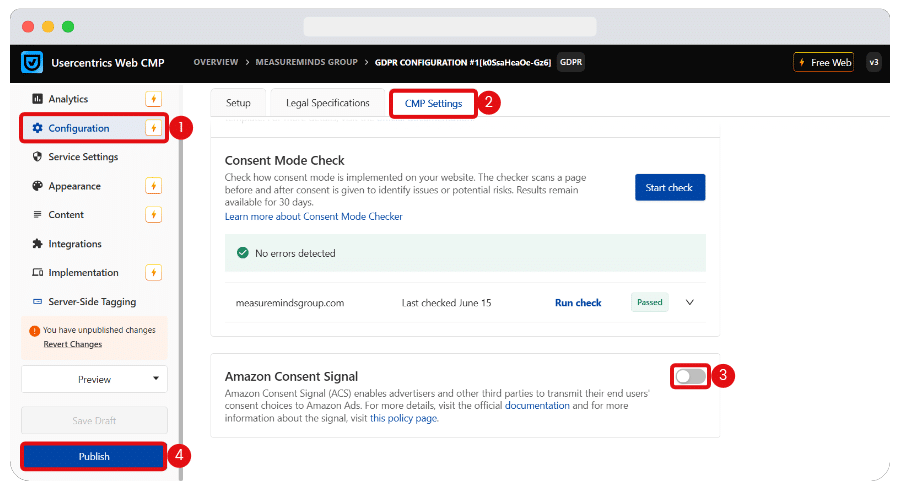
Once ACS is enabled, Usercentrics maps it to the Marketing category and the Amazon advertising data processing service. Make sure the Usercentrics script tag is live on the website, then test the output on the page to confirm the signal is being written properly.
There is one important exception here. If the site uses the TCF template, review that setup instead, because the TCF string overrides ACS.
Configuring Amazon Consent Signal in Cookiebot
Cookiebot also supports Amazon Consent Signal, but the setup is handled through the implementation rather than a visible toggle in the interface.
ACS is disabled by default in Cookiebot. It can be controlled in two ways:
- Add an attribute to the CMP script: Add data-amazon-consent-signal=”disabled” to the <script> tag that loads Cookiebot’s consent script.
- Add a query parameter to the script URL: Append ?amazonConsentSignal=disabled to the end of the script’s src URL.
Once ACS is active, Cookiebot stores a first-party amzn_consent cookie. It maps amzn_user_data and amzn_ad_storage to the Marketing category, so Amazon only uses data for ads and optimisation when consent is given.
As with Usercentrics, some setups may need a WAF rule update so the cookie is not blocked. The main exception is the TCF template. If that template is in use, review the TCF setup instead because the TCF string overrides ACS.
What to test after setup
Once the setup is live, start by checking the amzn_consent cookie on the page. Before interacting with the banner, open the console and run the snippet below to see the current Amazon consent state.
(function showAmazonConsentState() {
  console.log(
    "%cCode Snippet from MeasureMinds Group",
    "font-weight: bold; font-size: 1rem;"
  );

  const match = document.cookie.match(/(?:^|; )amzn_consent=([^;]+)/);
  if (!match) {
    console.warn("No Amazon Consent Signal cookie found");
    return;
  }

  try {
    const parsed = JSON.parse(decodeURIComponent(match[1]));
    const adStorage = parsed?.amazonConsentFormat?.amznAdStorage || '';
    const userData = parsed?.amazonConsentFormat?.amznUserData || '';
    const countryCode = parsed?.geo?.countryCode || '';

    const styleFor = v =>
      v === 'GRANTED' ? 'color:#0C0' :
      v === 'DENIED' ? 'color:#C00' : '';

    console.log("%cAmazon Consent Signal:", "font-size: 1rem;");
    console.log("\tamzn_ad_storage: %c" + adStorage + "%c", styleFor(adStorage), "");
    console.log("\tamzn_user_data: %c" + userData + "%c", styleFor(userData), "");
    console.log("\tcountryCode: " + countryCode);
    console.log("\ttimestamp: " + (parsed?.timestamp || ''));
    console.log("\tversion: " + (parsed?.version || ''));
  } catch (e) {
    console.error("Could not parse amzn_consent", e);
  }
})();
If the setup is working, you should see DENIED before the user accepts Marketing consent.
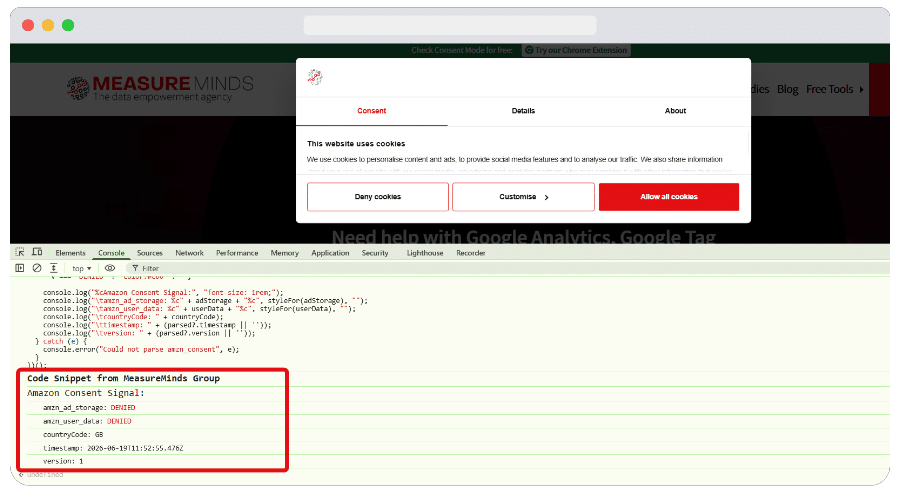
Then accept all from the banner and run the same snippet again. This time, amzn_user_data and amzn_ad_storage should switch to GRANTED, and the country code should still be present.
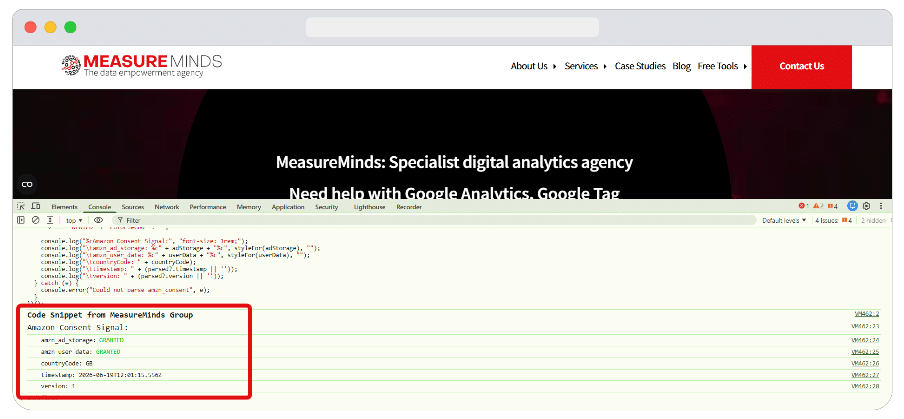
If the cookie does not appear at all, check whether your WAF is blocking it. It is also worth clearing site data and testing again in a fresh session, so an older consent state does not affect the result.
Common Amazon Consent Signal (ACS) mistakes to avoid
A lot of ACS issues come from small setup gaps rather than major technical failures. These are the main mistakes worth checking before you assume the implementation is working properly.
- Assuming Google Consent Mode covers Amazon: Google Consent Mode only covers Google products. It does not pass Amazon consent by itself.
- Turning on ACS without checking TCF first: If TCF is already the active route and Amazon is covered there, adding ACS on top can lead to unnecessary confusion.
- Not mapping Amazon correctly in Usercentrics: Adding the service is not enough on its own. Amazon still needs to be placed in the right category and checked on the live site.
- Assuming Cookiebot’s Marketing mapping is correct without testing it: The setup may look fine in theory, but the real check is whether the cookie and values appear properly on the page.
- Only checking that the banner appears: A visible banner does not prove Amazon is receiving the right signal. You still need to inspect the cookie and the consent values.
- Missing a WAF issue: If the amzn_consent cookie never appears, or looks broken, a WAF rule may be blocking it from being written correctly.
Conclusion
Amazon Consent Signal is one of those setups that can look finished in a CMP dashboard while still failing on the live site. The real check is whether Amazon is receiving the right values, whether the country code is present, and whether the signal changes properly when a user accepts or rejects Marketing consent.
If you want help reviewing your setup, testing the live output, or checking whether TCF or ACS is the right route for your site, our consent management service can help. A proper review can help you catch setup gaps before they affect reporting, audience use, or privacy compliance.
Amazon Consent Signal FAQs
What is Amazon Consent Signal?
Amazon Consent Signal, or ACS, is Amazon’s consent-sharing format for Amazon Ads. It tells Amazon whether a user has granted or denied consent for personal data use and ad-related storage.
Do I need Amazon Consent Signal if I already use TCF?
Not always. If your site already uses the IAB Transparency and Consent Framework and Amazon is covered there, TCF may already be the active route.
Is Amazon Consent Signal the same as Google Consent Mode?
No. Amazon Consent Signal is for Amazon Ads, while Google Consent Mode is for Google products such as Google Ads and GA4.
What are amzn_user_data and amzn_ad_storage?
amzn_user_data controls whether Amazon can process personal data for advertising. amzn_ad_storage controls whether Amazon can read or write advertising cookies or similar storage on the device.
How do I check whether the Amazon Consent Signal is working?
Check whether the amzn_consent cookie appears on the page, then confirm that amzn_user_data and amzn_ad_storage switch between DENIED and GRANTED when the consent choice changes.
One common reason is that the setup is incomplete or the cookie is being blocked. In some cases, a Web Application Firewall can stop the cookie from being written properly.
Can Usercentrics and Cookiebot both support Amazon Consent Signal?
Yes. Both can support ACS, but the setup path is different, and the live output still needs to be tested after configuration.