Privacy Attack Vectors: What are They & How to Defend Against Them

For many brands, privacy risk no longer sits only with regulators or internal compliance reviews. In the US, plaintiff firms and technical testers now examine websites for gaps in tracking, consent, and evidence.
That makes privacy attack vectors a practical business issue. Small implementation mistakes can lead to legal exposure, reputational pressure, and expensive clean-up.
That is also why early validation matters. Consent Mode Monitor gives teams a practical way to scan a domain or GTM container, identify missing or invalid consent signals, and fix common Consent Mode issues before they become larger measurement or governance problems.
We hosted a live session breaking down these exact risks and how to fix them. You can watch the full recording right here:
What Is a Privacy Attack Vector?
A privacy attack vector is any weakness in a brand’s tracking, consent, or measurement setup that allows data collection beyond what users expect or what the business can properly defend against. Sometimes that weakness is obvious, such as persistent identifiers or personal data ending up in analytics.
The term also matters because the risk does not end when the data is collected. Weak consent records, stale CMP deployments, and poor internal evidence can all become part of the problem once a lawsuit begins.
In that sense, a privacy attack vector is not just the method of tracking. It is the point where tracking, governance, and proof stop lining up.
How Privacy Attack Vectors Expose Brands
Brands rarely face privacy risks due to a single dramatic mistake. More often, the trouble starts with ordinary website tools that collect too much, fire too early, or leave weak evidence behind. These are the patterns that keep showing up in audits, complaints, and lawsuits.
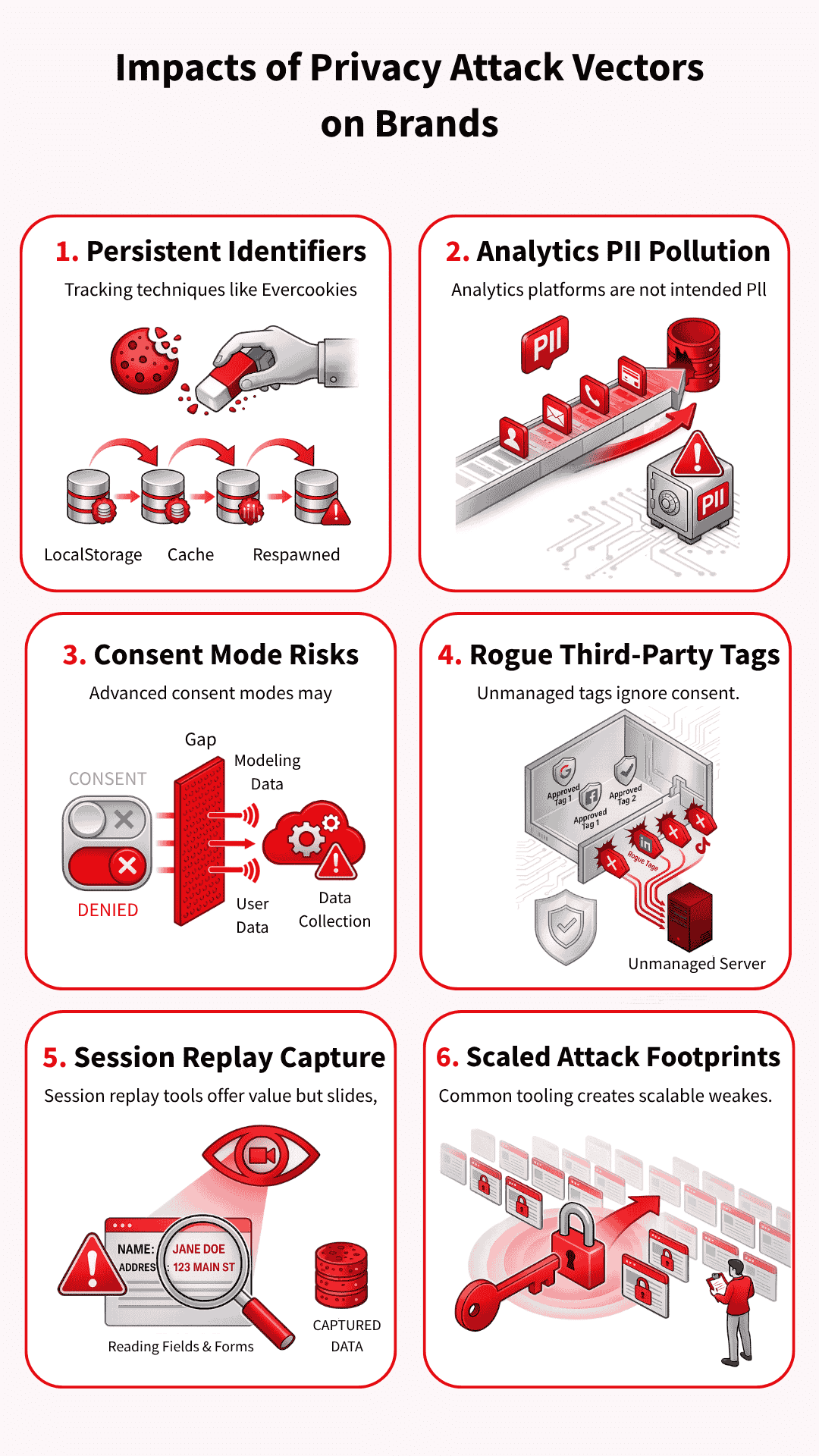
Persistent identifiers that defeat user choice
Some tracking methods persist even after a user clears cookies or resets their browser state. Evercookies (which store data in multiple locations to survive deletion), respawning techniques (which recreate deleted identifiers), and similar workarounds spread identifiers across multiple storage points and then rebuild them later.
That turns deletion into a nuisance rather than a real choice, which is exactly why these methods draw so much criticism.
PII and data pollution inside analytics tools
Analytics platforms are not built to hold names, email addresses, or other personal data in raw form. When that information slips into event parameters (the data sent with user actions), query strings (the part of a URL that carries information), or page paths (the specific parts of a website visited), the brand creates both privacy and analytics problems.
In the worst cases, polluted data can trigger account action, force deletion requests, and wipe out reporting that teams still need.
Consent mode signals after consent is denied
Advanced consent mode attracts attention because it does not simply switch measurement off when a user says no. Google uses consent-state and key-event pings to support modelling, helping marketers maintain reporting continuity.
The risk sits in the gap between what teams think a denial means and what the setup may still send for measurement purposes.
Many brands control their Google tags far more carefully than the rest of the stack. Then a Meta pixel, LinkedIn tag, share widget, or hardcoded script loads outside the main consent logic because nobody classified it properly or added the right blocking rule.
One forgotten tag can cause trouble, but the bigger problem is the lack of control over the entire chain of vendors and downstream calls.
Session replay tools that move from analytics into capture
Replay tools promise product insight, but they can quickly slide into data capture if teams trust the defaults and stop there. Search boxes, comment fields, on-site forms (places where users enter information on a website), and custom inputs (fields created for specific use cases) need direct review, even when a tool offers masking controls (settings that hide sensitive information).
Once a replay tool starts collecting more than the team expects, it stops looking like harmless analytics and starts looking far harder to defend.
Common tooling that makes scaled claims easier
Common tools create common footprints. When the same session replay script (which records user interactions for playback), CMP pattern (Consent Management Platform interface), or widget (pre-built website component) appears across thousands of sites, technical testers and plaintiff firms can repeatedly scan for the same weak spots.
That repeatability makes privacy claims easier to industrialise, especially when the evidence only needs to look plausible at first glance.
Why Consent and Tag Governance Break Down
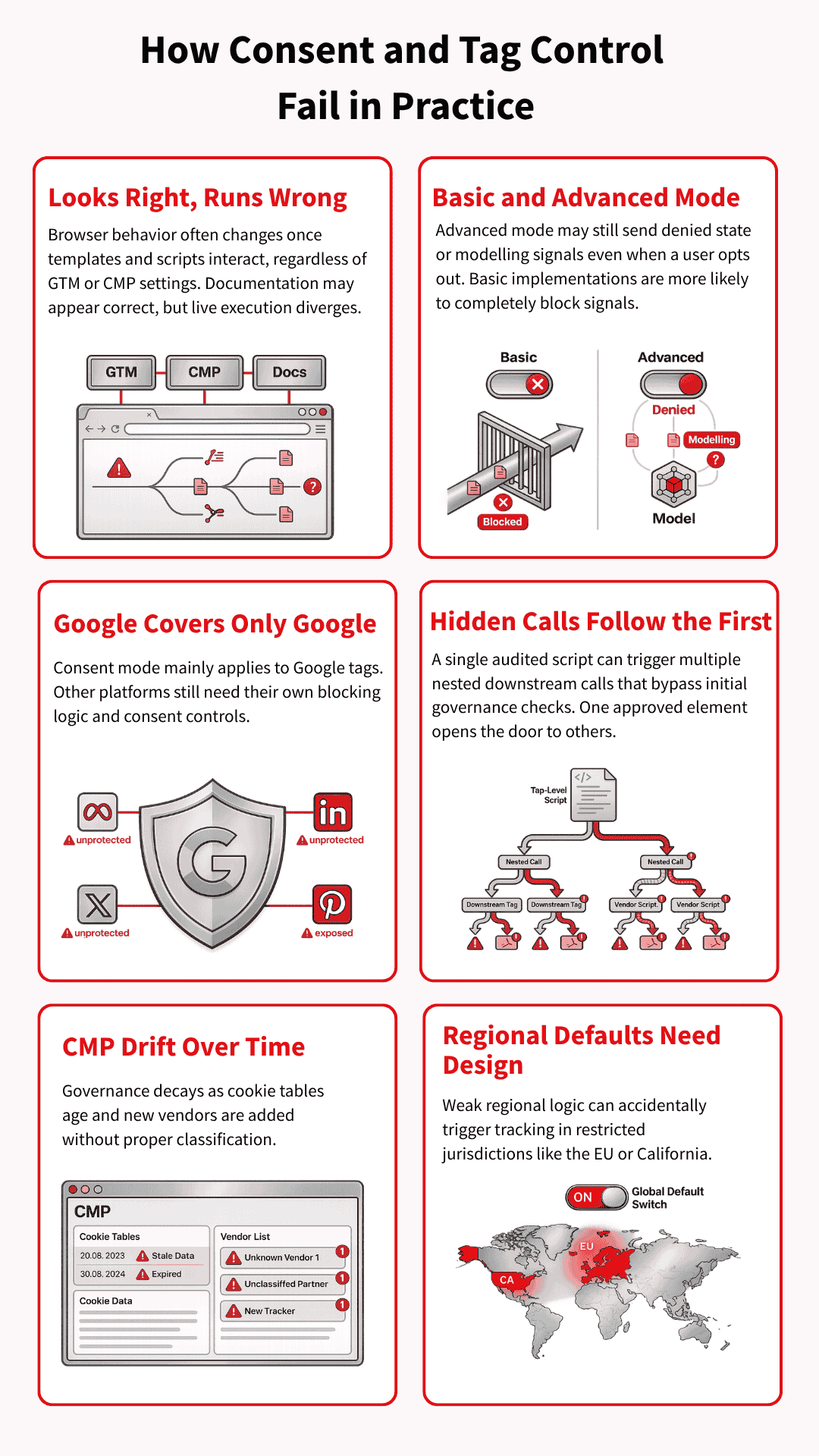
A set-up may look sensible in GTM, the CMP, and internal documentation, yet behave very differently once page templates, vendor scripts, and regional rules start interacting in the browser. That is why Tag & consent management governance failures often arise from ordinary implementation gaps rather than a single obviously reckless decision.
Basic and advanced consent modes carry different risks
Basic consent mode blocks Google tags until the user interacts with the banner, so nothing goes to Google beforehand. Advanced consent mode works differently: tags can load with denied defaults and still send consent-state or key event pings that support advanced modelling.
That extra measurement value explains its appeal, but it also raises a harder question: what happens after a user says no?
Google’s controls do not cover the whole stack
Consent mode is a Google framework, so it mainly governs Google tags. Meta, TikTok, LinkedIn, ShareThis, session replay tools, and other vendors still need their own consent categories, triggers, and blocking logic. Brands lose control when they assume Google’s framework covers tools it was never designed to govern.
Calls within calls create blind spots
Modern websites rarely load one clean layer of tags and stop there. They load embedded vendors, nested scripts, and in some cases containers inside other containers, which means one script can trigger several more downstream.
Teams often audit the visible layer and miss what fires after that first call.
CMP misconfiguration and outdated consent settings
A CMP can start in a good state and still fall out of date very quickly. Cookie tables get old, scanner runs never reach deployment, and small vendors slip in without proper classification.
That is why privacy failures often look less like legal misunderstandings and more like weak operational discipline.
Regional defaults need deliberate design
Consent defaults should not be treated as a single global setting. A brand may need denied-by-default behaviour in Europe or California, while using a different default elsewhere, depending on the legal position and the risk appetite.
If those regional rules are not carefully designed, the site can start tracking people in places where the setup was supposed to keep them out.
Technical Defensive Measures Against Privacy Attack Vectors
Once the weak points are clear, the next step is control. Brands reduce privacy exposure by tightening how tags fire, how consent is enforced, how data is minimised, and how changes are documented over time.
The goal is not to build a perfect stack. It is to make the stack easier to govern, test, and defend.
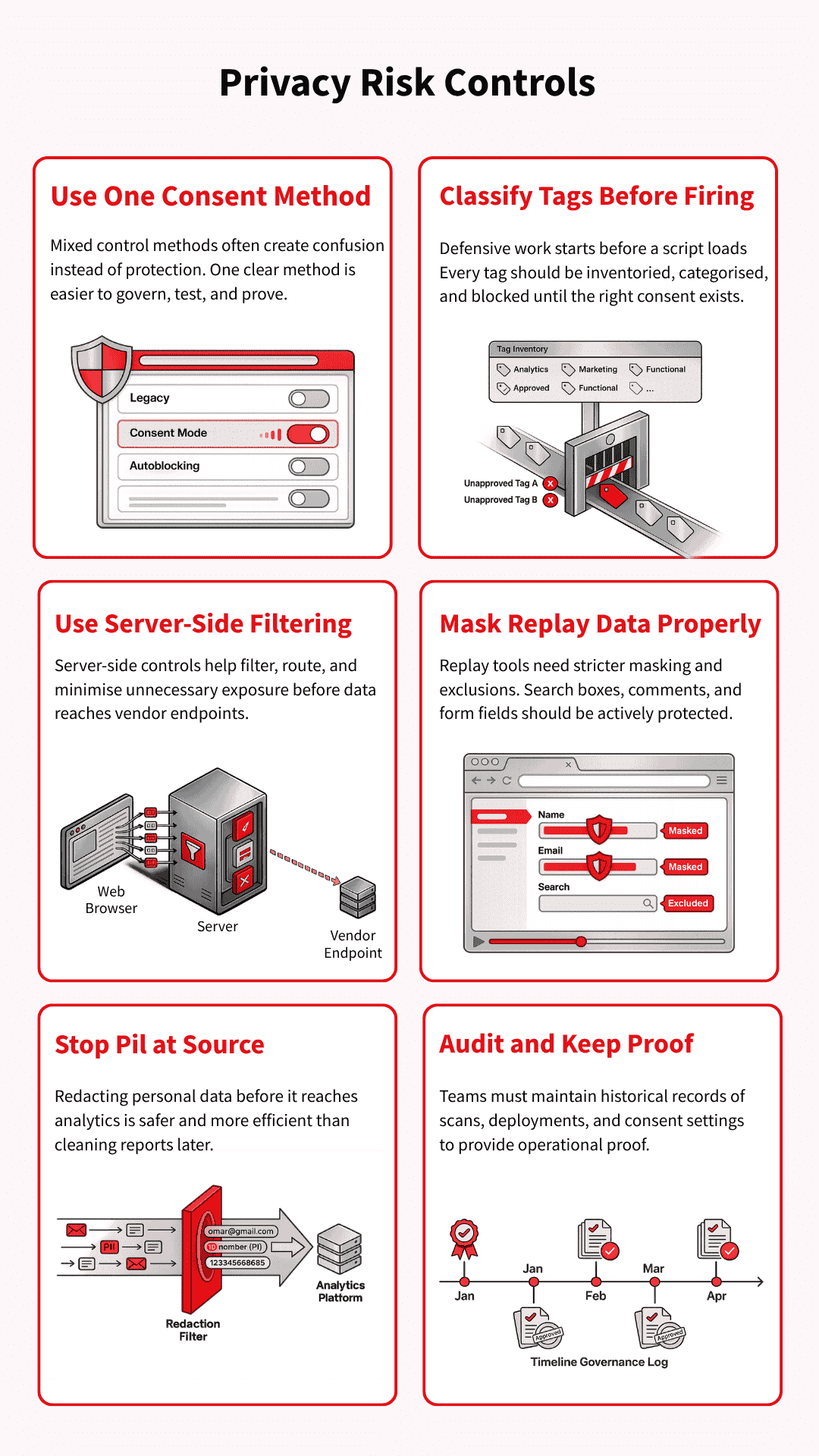
Pick one consent control method and use it properly
Mixed control methods commonly create confusion rather than protection. A team may combine legacy blocking rules, consent mode logic, and partial autoblocking, then struggle to prove what actually fires under each consent state.
One clear method, implemented and tested properly, is usually easier to govern than a layered setup nobody fully trusts.
Classify every tag and block before collection starts
Defensive work starts before a script fires. That means keeping a real inventory of tags, assigning each one to the correct consent category, and making sure triggers do not run early by default. If a vendor loads first and gets reviewed later, the control has already failed.
Use server-side controls to reduce unnecessary exposure
Server-side tag management can help reduce what leaves the browser and give teams tighter control over filtering, routing, and data collection. It can also support steps such as IP reduction or cleaner separation between site behaviour and vendor endpoints.
That said, server-side tagging does not eliminate privacy risks on its own, so it works best as part of a broader control model.
Use session replay tools with stricter masking and exclusions
Session replay tools need active configuration, not blind trust in default settings. Teams should review masking mode, exclude sensitive fields, and protect search boxes, comment areas, and form inputs that can reveal more than expected.
A session replay tool becomes easier to defend when the brand decides clearly what it will never collect.
Prevent PII before it reaches analytics
Once personal data reaches analytics, you can remove PII from an analytics platform like GA4. But the clean-up is slow, disruptive, and sometimes incomplete.
Brands are better off preventing it at source through safer data-layer design, GTM checks, parameter redaction, and testing of URLs and form flows that are likely to leak identifiers. Prevention is far cheaper than remediation after the data has already spread through reports and exports.
Audit on a schedule and keep proof of what changed
An audit only helps if it leaves evidence behind. Teams should keep records of scan dates, deployment dates, consent settings, tag changes, and vendor updates so they can show what the site was doing at a given point in time.
That record matters long before a lawsuit arrives, because it turns privacy governance into something concrete rather than something claimed after the fact.
Forensic Defences: Disputing Weak Privacy Claims
Once a complaint or demand letter arrives, the work changes. The question is no longer just what the site does in theory, but what actually happened in that visit and what the available records can prove.
That is where weak technical evidence, broken chronology, and missing consent records can start to undermine the story being claimed.
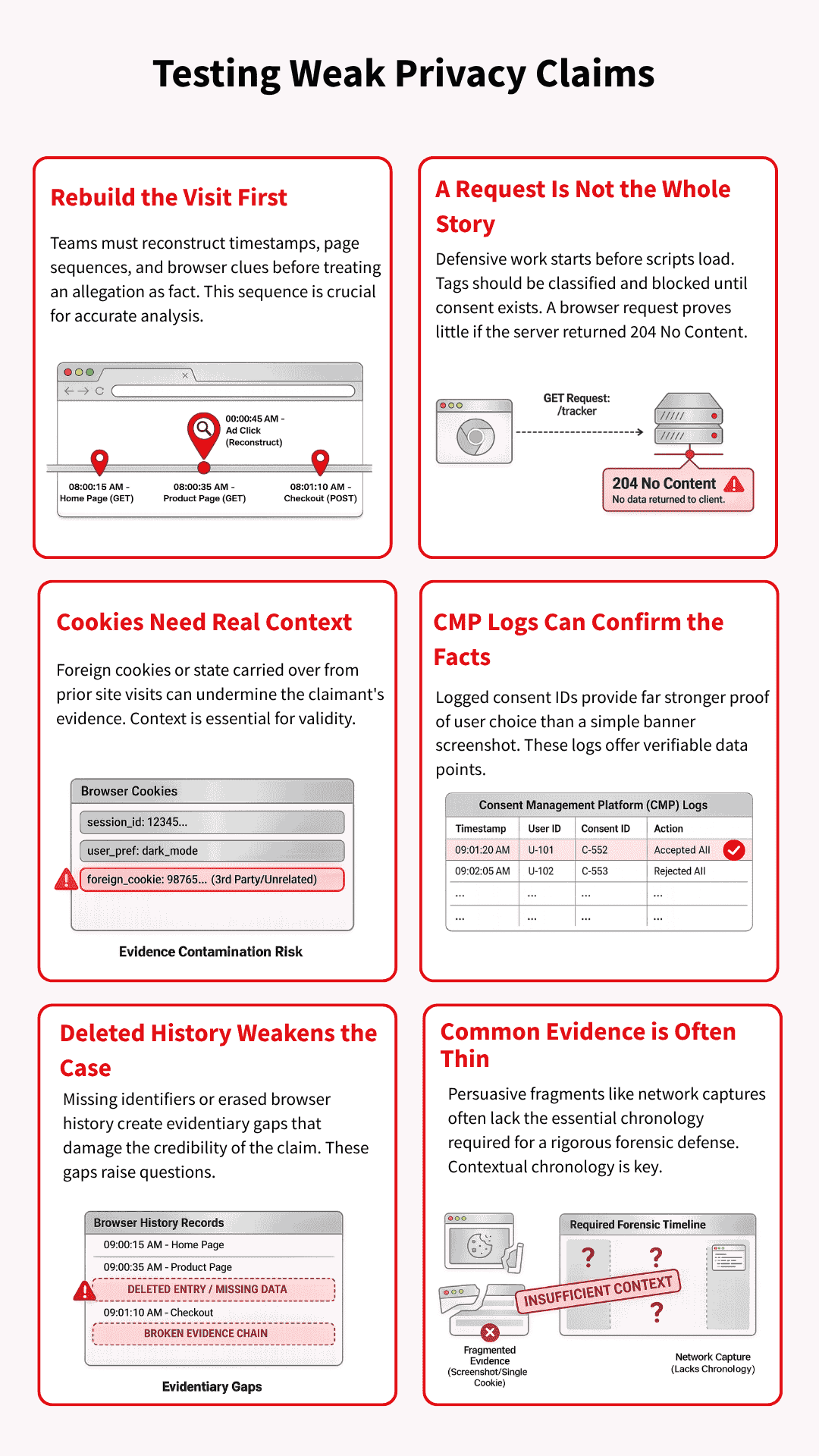
Rebuild the visit before reacting to the allegation
The first job is reconstruction, not panic. Teams need to line up timestamps, user-agent details, referral clues, consent events, and page sequence before treating the allegation as fact. A claim often appears stronger at first glance than it does after the visit path is properly rebuilt.
A 204 response may weaken the story being told
Some claims lean heavily on the fact that a request appeared in the browser, without giving enough weight to what happened next. If the server returned HTTP 204 No Content, it means the request was handled successfully, but no response content was sent.
In such a scenario, the technical record may tell a different story than the allegation suggests.
Cookie evidence is only useful if the journey that led to it makes sense. A prior visit to klaviyo.com, or the appearance of a OneTrust cookie on a site that does not use OneTrust, should raise questions about where the browser state really came from.
That kind of context can turn a neat accusation into a messier evidential problem.
Consent IDs and CMP logs can validate what happened
Good CMP records can do more than prove a banner was deployed. They can help show what choice was made, when it was made, and whether the later claim matches the stored consent history.
When those records exist and line up with the visit timeline, they give the brand something far more useful than a screenshot.
Deleted history can become a credibility problem
Evidence becomes weaker when key browser history, cookies, or local records are deleted. Deleted history and missing identifiers can make it much harder to validate a claimant’s account and test what can still be proved.
At that point, the dispute shifts from pure tracking theory to the reliability of the evidence itself.
Common evidence is often thinner than it looks
A screenshot, a cookie snapshot, or a network capture can look persuasive without proving very much on its own. Those fragments often lack chronology, consent status, prior visits, duplicate requests, or whether the browser was already carrying data from elsewhere.
Forensic discipline matters on both sides, because privacy claims can harden around assumptions long before the evidence is tested.
The Next Attack Surface: AI Agents, MCP, and Agentic Consent
Privacy attack vectors are starting to move into AI-led browsing and agentic workflows, but the core questions have not changed. Someone still needs to know what was collected, under which permission, and with what record.
The difference is that an agent may now be the one reading the banner, making the choice, or passing data into a wider system.
Agents that deny by default and get stuck in consent loops
An AI agent may not handle a cookie banner the way a normal user would. It may reject by default, fail to understand the options, or get trapped in consent-or-pay flows that were designed for humans rather than automated visitors.
That creates a fresh problem for both measurement and compliance, because the site now has to interpret behaviour from a browser that is acting on someone else’s behalf.
“Do not train” is still a missing consent control
Many consent set-ups still treat personalisation, advertising, and broader data use as if they fit neatly into the same buckets. That breaks down when AI training enters the picture, because training use raises a different question from ad targeting or analytics.
If a system reuses data for training without a clear user-level control, the gap becomes harder to defend later, especially when removal may be difficult or impossible.
MCP and agent governance create a new control layer
As agents start connecting to tools, files, systems, and workflows through protocols such as MCP, privacy controls will need to move closer to that access layer.
The issue is no longer only whether a tag fired in the browser. It is also whether an agent could reach a system, use a tool, or pass data onward without the right policy, permission, or audit trail in place.
Suggested visual: A diagram showing a user, an AI agent, a consent layer, an MCP server, and the analytics or advertising endpoints the agent can reach.
A new deadline: December 2026
A new US law is being introduced in December called SB 690. This relates to the California Invasion of Privacy Act (CIPA) and stops all wiretapping claims.
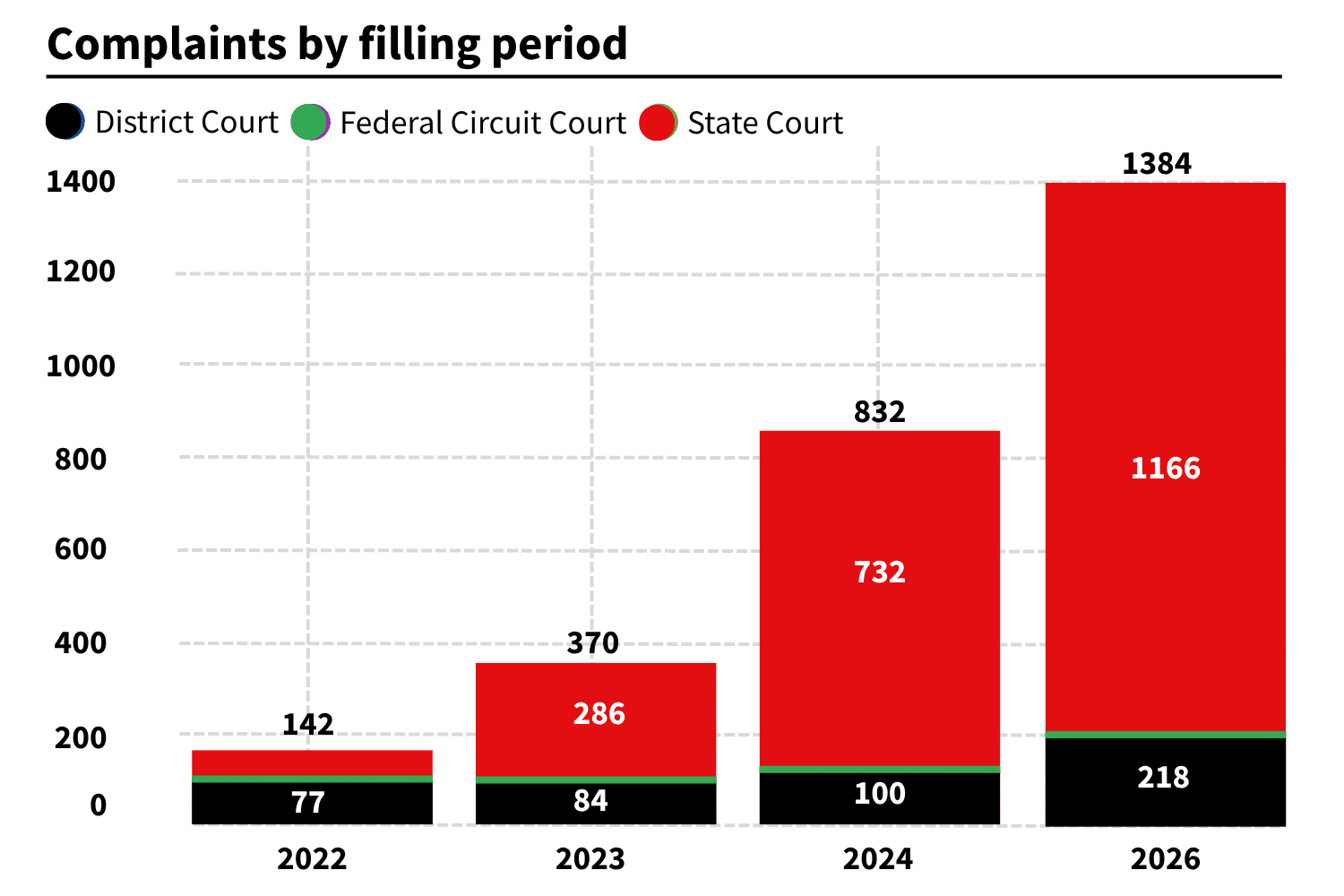
While this might be good for businesses, it unfortunately means there will be a massive ramp-up of claims between now and then.
Why is this change occurring now?
The need for new legislation can be attributed to various factors, including
Retro laws and a complex tech environment
GDPR, the fundamental law on which other data privacy laws are based, is now eight years old. The CMP technology, Optanon (eg, OneTrust), is ten years old.
Alongside this, new technologies and protocols have emerged, including
- Google ConsentMode V2
(ad_storage + ad_user_data + ad_personalization) - Microsoft ConsentMode V2
(adStorage rather than ad_storage) - Amazon ConsentMode
(setEnableAdStorage + setEnableUserData) - GCP signal (a new US-standard version of Do Not Track)
In addition to the above, there is also technical debt occurring within tag management systems. GTM loads gtag.js while sometimes also loading inline gtag.js. GTM itself can also be used to load GTM Zones (from a 360 account).
Layered with Consent Mode defaults and updates, it becomes difficult to set up and maintain accounts properly. It also enhances the chance of consent mode mistakes.
Lastly, there are no global standards for cookie settings, footer links or opt-out links. This makes it much more difficult to change CMPs. You need to take additional complex steps, such as changing the IP that users are attached to or updating the inline autoblock.
An end to private-sector civil incentives
In the US, plaintiffs’ attorneys are incentivised to track down non-compliance. California users can claim $5,000 for a violation of CIPA. If a user files a claim, companies have zero days cure period.
This has enabled attorneys to make extremely large profits. AT&T, for instance, was hit with a $177 million settlement.
These problems will only worsen over the next six months.
A rise in privacy-detecting tech
In recent years, there has been an acceleration in AI-powered privacy-detecting tech. Examples include
- Acceleration in Privacy Detecting Tech
- Claude CMP audit
- GTMspy chat
- MCP network analysis tools
- TMS scanners
These data privacy tools make it much easier for average users to find privacy problems on websites.
Making matters worse, as plaintiff’s attorneys earn more, their funds fuel investment in better detection techniques.
Is it possible to get a website exemption from CIPA wiretapping claims?
As we mentioned earlier, SB 690 is on its way, helping businesses avoid lawsuits relating to common web analytics and tracking tools. Sadly, this law only applies from the 1st of January 2027 onwards. If you’re hit by a CIPA claim now, you only have two options: defend or settle.
Defending against wiretapping claims
Luckily, there are tools designed to help protect you from wiretapping claims. These tools detect or fix issues, helping you defend yourself proactively.
Examples of these tools include
ObservePoint.com
Verified-Data.com
SentinelInsights.com
ConsentModeMonitor.com
Stape WebsiteTrackingChecker
ToDo.law
NymityAI
webclew.com/product#consent-compliance
Will I be hit by the privacy law?
Unfortunately, the answer is probably yes.
There are, however, factors that determine whether you are likely to be hit first. You’re more at risk if any of the following apply to you.
- Primary verticals – If you collect health, finance & banking, or children’s data.
- Secondary verticals – If you operate as a publishing (eg, data broker), charity, or e-commerce site.
- Company size – If you exceed $25m global revenue per annum or have Pre-IPO status (a startup in growth mode).
- Digital Marketing importance – If 50% or more of your sales come from your website, you’re spending more than $1m per month on Google Ads, or Q4 and Black Friday are your busiest time of year.
- Settlement history – If you have publicly known settlement cases, or your competitors have been hit.
- Tech stack – If your stack is old, you don’t use inline code or server-side GTM, or have yet to implement consent mode. Using OneTrust can also be a problem, as the tool is over ten years old and easy to decipher.
- Privacy policy – If you haven’t reviewed your privacy policy in the past 12 months or have fewer than 2 contact mechanisms for users to register complaints. If you are missing 11 categories of data for CPRA, or are lacking a dynamic privacy policy table.
- Footer links – If you’re missing a cookie settings (or floating left-aligned widget). If you have neglected to include a ‘do not sell’ link or are missing a DSAR opt-out form link.
- Tech tests – If you don’t honour GCP signals and offer an ‘honoured’ response message. If you don’t have an opt-out that actually works. If California users don’t automatically go to opt-in mode.
- Audit frequency – If you have never run a CMP audit and have not changed your CMP for two or more years. If you don’t have a DSAR opt-out link or are not responding within 30 days. If a plaintiff/regulator asks for evidence of internal safeguards, and you have no “ready-made PDF defence pack” available to share.
Privacy attack vectors
There are several common and problematic attack vectors. Be wary of the following examples.
Using free tools
Web developers commonly include ShareThis or Facebook-like buttons on sites. These are often added in the global header and forgotten about. Unfortunately, these elements are outside of consent, and so are often ignored when a user sends an opt-out signal.
As a general mantra, remember that if something is free, it’s likely part of an ad network and shouldn’t be used. Where possible, pay to use an equivalent or change your tools (eg, load YouTube in no cookie mode).
You can check your website for ShareThis links.
URL restrictions
Problems arise if you add remarketing tags on internal site search pages, or if you have medical conditions listed on your site. Google and Facebook Ads do not have a BAA agreement under HIPAA, meaning you cannot share medical or sensitive information.
Controller keystrokes masking
Be sure to switch on keystroke masking for open text fields if you use Microsoft Clarity. Otherwise, you risk accidentally capturing sensitive data.
AutoBlock installation and monitoring
If you use OneTrust with AutoBlock, make sure it’s loaded within the header (or as high up as possible). Never use defer=true or load in the footer of the page. Doing so results in tags firing outside of consent
If you use AutoBlock with small remarketing networks, ensure you update OneTrust once a month. The feature won’t function correctly without regular monitoring and maintenance.
Wrong consent categories
Without careful attention, it’s easy to make simple mistakes within tag settings. If left unaddressed, these leave you vulnerable to litigation.
Consider the following areas when assessing your consent settings.
- Be careful with your use of remarketing tags, especially with Google or Bing. Both of these add tags as custom HTML rather than templates, meaning they won’t be automatically categorised as ad storage.
- Neither LinkedIn, Facebook, nor Bing have Google Ads categories. Bing does support Google Consent Mode, but it must be set as ‘read default consent.’
- Be wary of Tags that start in one state and finish in another. Klavio, Mailchimp, and ActiveCampaign all begin as analytics tags and transform into targeting.
- Microsoft Clarity is potentially in the wrong category for tags. Instead of ‘analytics’ select ‘targeting.’ As an ad network, Bing is likely to use engagement data for marketing purposes in future, so it’s safer to opt for the targeting tag category.
Strengthening your defence
It’s always safer to take a proactive approach and avoid Consent Mode fines by having the right protections in place. With that in mind, here are some of the steps you can take to strengthen your defence.
Chrome extensions
Listed below are some of our favourite plugins for detecting privacy attack vectors.
- Ghosterly
- Privacy Sandbox Analysis Tool
- Tag Assistant
- Meta Pixel Helper
- UET Tag Helper (by Microsoft Advertising)
- Pixel Helper for LinkedIn
- Pinterest Tag Helper
- Global Privacy Control (GPC) Inspector
- VPN for Chrome: NordVPN
- Consent Mode Monitor (recently updated)
CMP scanning
Set your CMP to scan “in Necessary only” mode and “Accepted mode scan.” This will help you find issues such as tags firing outside of consent. Be sure to scan from California IP or append ?otgeo=US,CA to scanned pages. Make sure you remember to scan authenticated or login pages.
Alongside these, use the following methods and tools to detect potential issues
- Set ScreamingFrog to scan for .js files
- Check Consent Mode by ensuring the ConsentModeMonitor GoogleSheet is running in Bulk scan mode
- Run a Google Tag Diagnostic Scan (not always useful, only applies to Google products)
- Run a scan with Claude.
- Check from different Jurisdictions with this GoogleSheet.
- Hire an Ethical Privacy Hacker to find site issues.
Conclusion
Privacy risk rarely comes from one tool in isolation. It grows in the gaps between consent settings, tag behaviour, replay controls, vendor governance, and the records a brand keeps when something goes wrong.
Brands that close those gaps early do not just reduce legal exposure. They also give themselves a much stronger technical and evidential position if their set-up is ever challenged.
- Top 24 Google Analytics Chrome Extensions & Sheets Add-ons - 21/05/2026
- Best Consent Management Platforms (CMP) - 19/05/2026
- Google Signals and Consent Mode: What This GA4 Change Really Means - 23/04/2026